
Kinetic Walls
Draw, stretch, split, and reshape connected walls with intuitive controls. Every change is applied across the layout automatically, keeping the entire structure consistent.
Drag Wall is an online 2D floor planner built for architects, remodelers, and homeowners who want to draft the house and feel the space with professional blueprints.
Draft accurate layouts with speed and ease. Every tool is optimized to deliver professional blueprints from start to finish.
Draw, stretch, split, and reshape connected walls with intuitive controls. Every change is applied across the layout automatically, keeping the entire structure consistent.

Add arches, curved openings, and structural beams directly into your floor plan. Create detailed architectural layouts.

Switch between metric and imperial measurement systems at any time. All dimensions remain accurate and are displayed using the selected unit system.

Snap walls, furniture, openings, and structural elements using magnetic guides. Align every object quickly while maintaining accurate positioning.

Build kitchen layouts with modules that automatically adapt to wall geometry. Rearrange cabinets and countertops while preserving the overall composition.

Clone floors to build upper levels or test variations. Enable Trace Mode to align floors visually and export each level as a separate page in your construction-ready PDF.
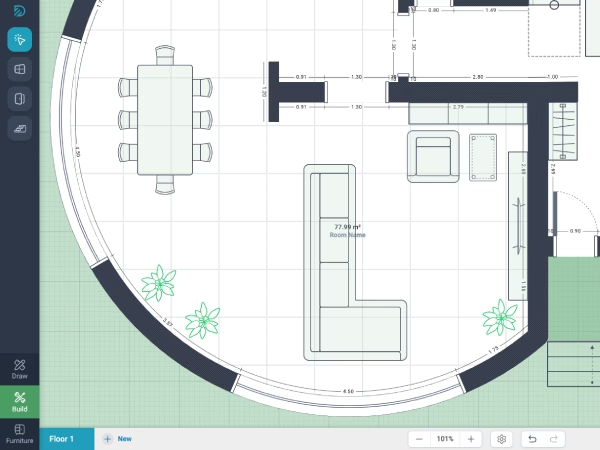
Design accurate 2D layouts with precision control. Draw exterior walls, internal partitions, and curved structures with flexible thickness settings. Smart magnetic snapping keeps every element perfectly aligned with grids, axes, and wall intersections.
 Straight, partition, and curved walls14 snap types (grid, axes, corners)Custom wall thicknessesDoors, windows, and snappable openings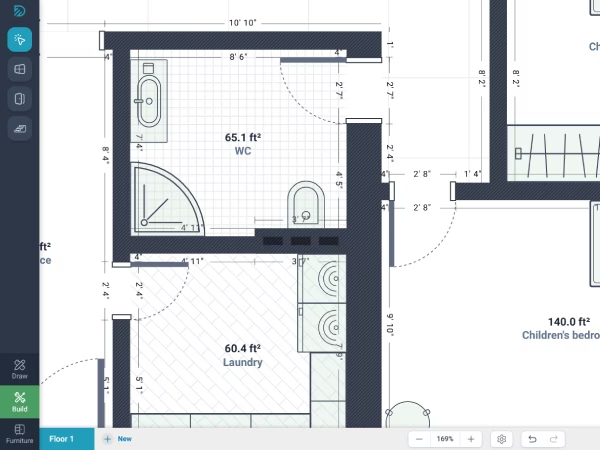
Populate rooms with realistic furniture, kitchens, bathrooms, and stairs. Smart snapping technology automatically aligns every element with your walls.
Catalog of beds, chairs, and bathroom fixturesAdaptive kitchen system for countertops & appliancesSnappable straight, spiral, and L-shaped stairsSmart object-to-wall magnetic snapping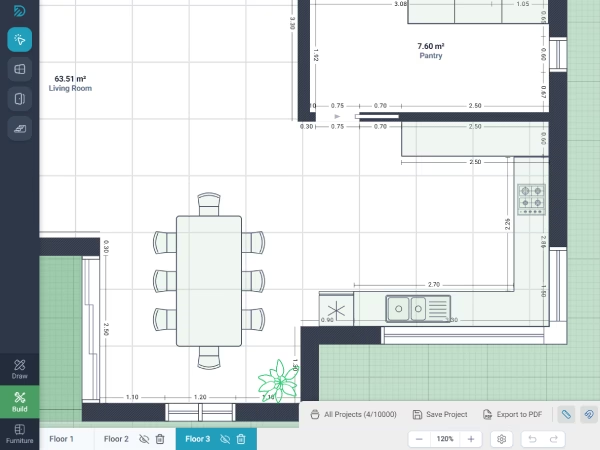
Create, duplicate, and organize complete architectural projects with a powerful multi-floor workflow. Automatic room detection calculates areas instantly, while professional PDF exports generate clean documentation using ISO standards.
Multi-floor project organization with tabbed navigationAutomatic room and structure area calculationsCustom branded exports with your company logoMulti-page PDF drawing sheet exportYour projects are safely retained on your account and are never deleted due to plan expiration. When your paid access ends, you switch to the free tier (1 project limit) and can reactivate full access anytime with a new plan.
Choose the plan that suits you best
Choose the plan that suits you best
For private practice and personal projects.
For freelance designers and small studios.
For professional teams and growing businesses.
For construction firms and large companies.
* Prices in USD (excl. taxes). Payments processed by our Merchant of Record (MOR).
Local taxes (VAT) and business invoice fees are calculated at checkout. See Terms of Purchase.
No. All paid plans are one-time purchases that provide access for a fixed period.
There are no recurring charges or automatic renewals.
Your projects remain safely stored on your account and are never deleted due to expiration.
When your access period ends, your account switches to the free tier (1 project limit). You can unlock all your saved projects again at any time with a new plan.
Yes. You can purchase a different plan at any time to increase your project limit or unlock additional features.
In Drag Wall, each floor acts as a distinct drafting layer. You can create a new floor or clone an existing one to build upper levels or test design variations.
Enable Trace Mode (the eye icon) to see a semi-transparent view of the lower floor for precise wall alignment. This workflow also allows you to export a multi-page PDF with all levels and revisions in a single document.
Yes. You can export high-resolution, vector PDF drawing sheets compliant with architectural drafting standards.
Plans can be printed at precise architectural scales (such as 1:50 or 1:100) or exported as crisp digital layouts to share directly with clients, contractors, and permit authorities.
There are no limits on canvas scale or room dimensions — you can design spaces ranging from compact studio apartments to massive multi-room residential or commercial developments.
To ensure practical, construction-ready blueprints, furniture and fixtures adhere to real-world dimensional proportions, while project and floor quotas scale according to your chosen plan.
Design partition walls, arrange smart furniture, and visualize your future space in minutes.